


Expanding On The Step Processor
Table of Contents:
I published an article on the Salesforce architecture website discussing the Step-Based Framework for high throughput bulk processing not that long ago, and I wanted to expand on that article here. Despite the opinions that I see regularly making the rounds online about Salesforce not being a performant place to do bulk processing of records, code like the Step-Based framework makes it possible to quickly go through tens of millions of records without any issue. We use our step processor to enable complex accounting requirements globally; the framework itself allows our accounting teams to onboard different parts of the business without the core processing logic needing to be updated.
There were a few features that I didn’t get the chance to talk about in the article, or that I could only allude to in order to save space, that I thought it might be interesting to look at here.
Reviewing The Architecture
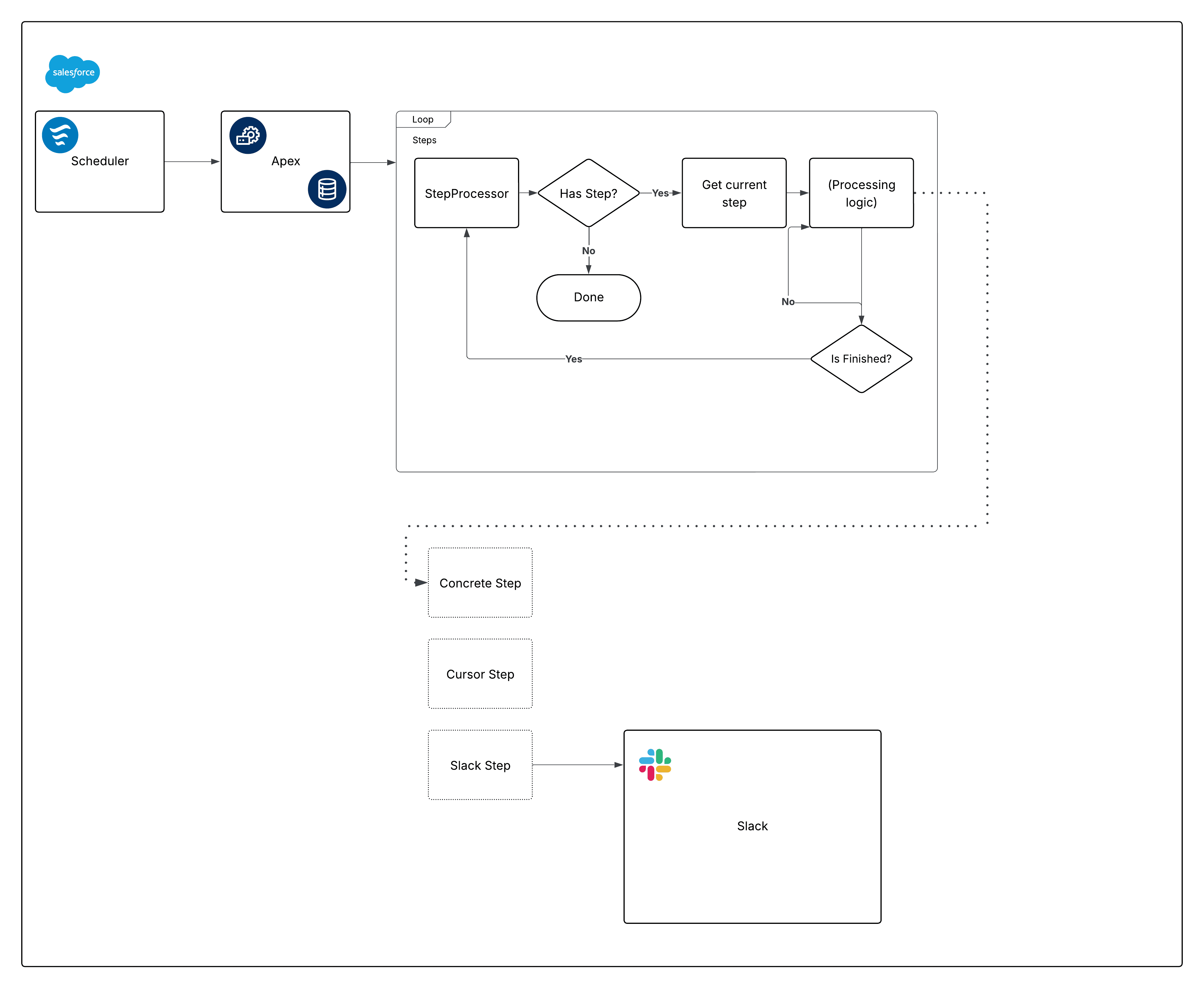
In case you missed it, here’s the basics of the step-based framework:
The framework itself relies on Scheduled Flow to get called:
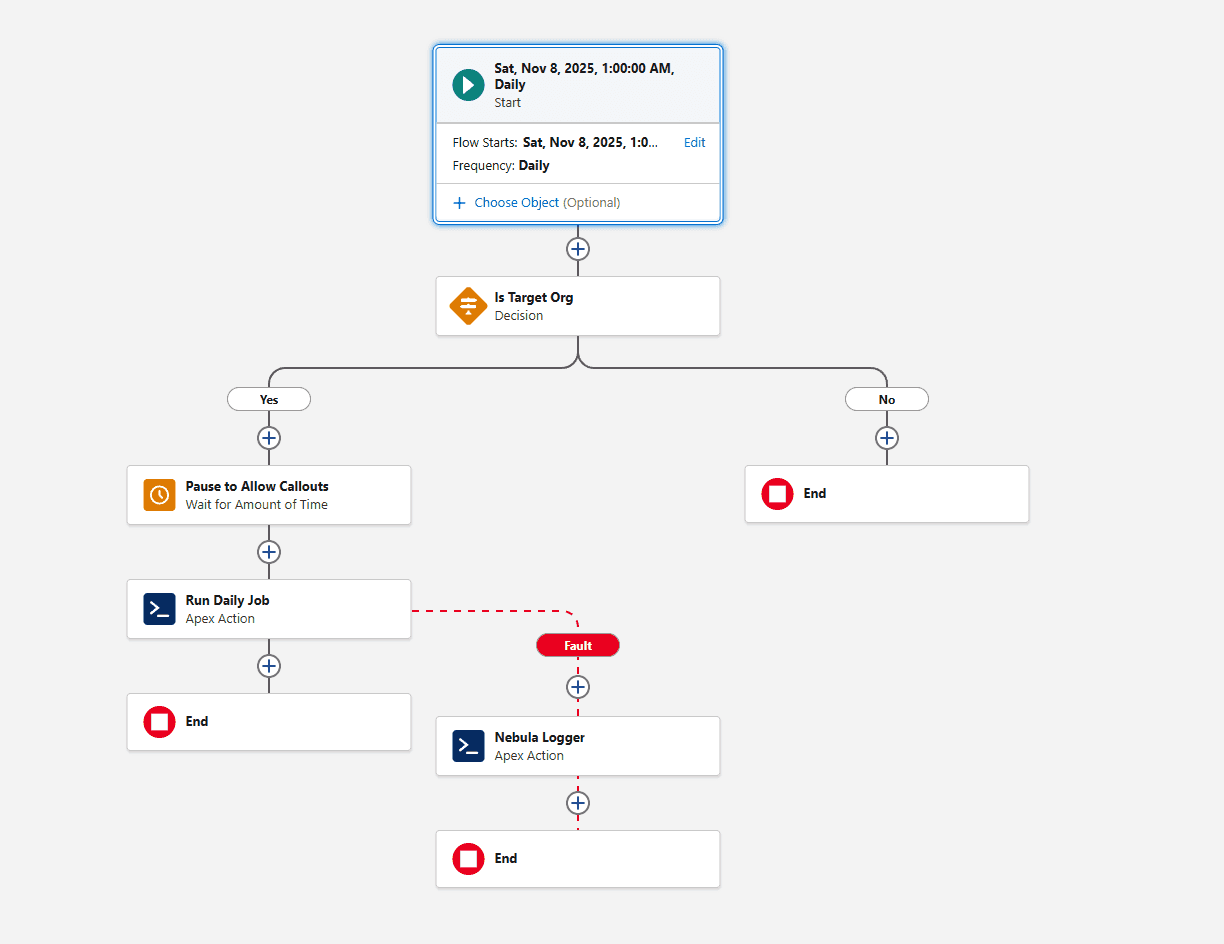
As always, we use Nebula Logger in key places without the architecture — along with the Slack Plugin for it — to alert us to any failures. Because we’re using Queueables under the hood to power the step processor, at a high level that also means that it’s easy to consolidate error handling:
public class StepProcessor implements System.Queueable, System.Finalizer,
 Database.AllowsCallouts {
  // ...
  public void execute(System.FinalizerContext context) {
    Logger.setAsyncContext(context);
    Logger.setParentLogTransactionId(this.parentLogTransactionId);
    if (String.isNotBlank(this.getLoggerScenario())) {
      Logger.setScenario(this.getLoggerScenario());
    }

    Logger.info('Executing finalizer for step ' + this.currentStep?.getName());
    switch on context?.getResult() {
      when UNHANDLED_EXCEPTION {
        Logger.warn('Failed to run on step' + this.currentStep, context?.getException());
      }
      when else {
        this.currentStep.finalize();
        Logger.info('Finished executing finalizer for step ' + this.currentStep?.getName());
        if (this.currentStep.shouldRestart()) {
          this.kickoff();
        } else if (this.steps.isEmpty() == false) {
          this.currentStep = this.steps.remove(0);
          this.kickoff();
        } else {
          this.handleFinish();
          Logger.info('Finished executing steps');
        }
      }
    }
    Logger.saveLog();
  }
  // ...
}
In less than 30 lines of code, we’ve encapsulated:
- observability
- error-handling
- re-enqueue logic
Not too shabby.
Introducing State
I mentioned this briefly in the article but wanted to expand upon it here. It’s not desirable for our purposes that every step remain independent of one another. Consider the following scenario:
- step 1 runs
- step 2 runs
- step 3 runs but needs to know something that was only available in step 1
If we took inspiration from functional programming, we’d want to set up our steps in such a way that the output for each step was passed as an argument to each subsequent step. In object-oriented land, introducing a state parameter is not that much different:
public class StepProcessor implements System.Queueable, System.Finalizer,
 Database.AllowsCallouts {

  public virtual class StepState {
  }

  public interface Step {
    void execute(StepState state);
    void finalize();
    String getName();
    Boolean shouldRestart();
  }

  protected virtual void handleFinish() {
    Logger.debug('Handle finish');
  }
}
We’ll come back to that handleFinish() method in a bit.
Because we are using package-based development, the base StepProcessor exists in one repository, and our implementations reside elsewhere. We could make StepState an interface — there’s no harm in that — but we’ve left it as a virtual class for now in the event that we end up pushing some shared logic into it (which wouldn’t be possible with an interface). Of course, this means we have to address the elephant in the room: without generics, subclasses have to cast the state to the concrete implementation.
In the Architect article, I show off our shared CursorStep implementation (which itself relies on the Cursor abstraction within apex-dml-mocking):
public without sharing abstract class CursorStep implements AsyncProcessor.Step {
  protected  StepState state;
 // ...
  public void execute(StepState state) {
    this.state = this.state ?? state;
  }
}
To ease the pain, our concrete CursorStep implementations look like this:
public class Namespace {
  public class ConcreteState extends StepState {
    public final Set<Id> idsNeededInMultipleSteps = new Set<Id>();
    public final Map<String, Map<Id, SObject>> loggerValidationToRecords =
      new Map<String, Map<Id, SObject>>();
    // ...
  }
}
public without sharing abstract class ConcreteCursorStep extends CursorStep {
  protected Namespace.ConcreteState getState() {
    return (Namespace.ConcreteState) this.state;
  }
}
Everything Can Be A Step
We’ve joked as a team that “everything is a step” because CursorStep makes adding bulk-safe operations trivial, and the basic Step interface is always available when simpler operations are needed. As an example: because our steps control complicated accounting practices, and there are multiple iterations of the same steps that are performed for different teams, we needed to add a “final” step to each iteration to clean up the state object:
public without sharing class StateCleanupStep implements AsyncProcessor.Step {
  public void execute(AsyncProcessor.StepState state) {
    Logger.debug('Clearing Ids...');
    Namespace.ConcreteState castState = (Namespace.ConcreteState) state;
    castState.idsNeededInMultipleSteps.clear();
  }

  public void finalize() {
    Logger.debug('Nothing to finalize');
  }

  public String getName() {
    return StateCleanupStep.class.getName();
  }

  public Boolean shouldRestart() {
    return false;
  }
}
We can easily unit test this particular step without needing to involve the whole processor:
@IsTest
private class StateCleanupStepTest {
  @IsTest
  static void itOnlyClearIds() {
    Namespace.ConcreteState state = new Namespace.ConcreteState();
    state.idsNeededInMultipleSteps.add(
      TestUtilities.generateId(User.SObjectType)
    );
    state.loggerValidationToRecords.put('Some logging string', new Map<Id, SObject>());


    AsyncProcessor.Step step = new StateCleanupStep();
    step.execute(state);

    Assert.isTrue(state.idsNeededInMultipleSteps.isEmpty(), 'Ids should have been emptied');
    Assert.isNotNull(
      state.loggerValidationToRecords.get('Some logging string'),
      'Logger validation map should not be cleared'
    );
    Assert.isFalse(step.shouldRestart());
  }
}
I’ve snuck in another state variable here: loggerValidationToRecords. Remember the virtual handleFinish() method in the base StepProcessor class? In our concrete implementation, we use Nebula Logger to send any warnings registered by individual steps:
// in our concrete StepProcessor class
protected override void handleFinish() {
  if (
    this.state.loggerValidationToRecords.isEmpty()
  ) {
    return;
  }

  Logger.warn(
      'Validation warnings found during step processing:\n\t• ' +
      String.join(this.state.loggerValidationToRecords.keySet(), '\n\t• ')
    );

  for (String keyMessage : this.state.loggerValidationToRecords.keySet()) {
    Logger.info(keyMessage)
      .setRecord(
        this.state.loggerValidationToRecords.get(keyMessage).values()
      );
  }
}
That solo Logger.warn call routes to one of our Slack channels, and then we can open the full log to see the individual entries with more info.
Apex Slack SDK Steps
One other bit that was out of scope for the Architect article that I thought it might be interesting to talk about is mixing in the Apex Slack SDK as a step. For the most part, this is a relatively painless process:
public without sharing class SlackMessenger {
  private String existingStack;
  private Boolean shouldRunSync = false;
  // ... mostly ellided, but we make liberal use of this interface
  // when sending slack messages
  public interface RequestBuilder {
    Slack.ChatPostMessageRequest build();
  }

  public SlackMessenger registerExistingStack() {
    this.existingStack = new LoggerStackTrace().ParsedStackTraceString;
    return this;
  }

  @SuppressWarnings('PMD.AvoidBooleanMethodParameters')
  public SlackMessenger setShouldRunSync(Boolean shouldRunSync) {
    this.shouldRunSync = shouldRunSync;
    return this;
  }
}
// ....
public without sharing abstract class SlackNotifierStep extends CursorStep {
  @SuppressWarnings('PMD.FieldNamingConventions')
  @TestVisible
  private static Integer CALLOUT_LIMIT = 100;

  protected Integer waitTimePerMessageInSeconds = 0;

  protected final List<SlackMessenger.RequestBuilder> overflowRequests = new List<SlackMessenger.RequestBuilder>();
  protected final SlackMessenger slackMessenger;

  protected abstract Slack.App getSlackApp();
  protected abstract List<SlackMessenger.RequestBuilder> getRequests(List<SObject> records);

  protected virtual override void innerExecute(List<SObject> records) {
    List<SlackMessenger.RequestBuilder> requests = records.isEmpty() == false && this.overflowRequests.isEmpty()
      ? this.getRequests(records)
      : this.overflowRequests;

    List<SlackMessenger.RequestBuilder> sendableRequests = new List<SlackMessenger.RequestBuilder>();
    while (requests.isEmpty() == false && sendableRequests.size() < CALLOUT_LIMIT) {
      sendableRequests.add(requests.remove(0));
    }
    this.overflowRequests.addAll(requests);

    this.slackMessenger.registerExistingStack()
      .setShouldRunSync(true)
      .setWaitTimePerMessage(this.waitTimePerMessageInSeconds)
      .run(this.getSlackApp(), sendableRequests);
  }

  protected virtual override Integer getFetchesPerTransaction() {
    return 1;
  }

  public virtual override Boolean shouldRestart() {
    return super.shouldRestart() || this.overflowRequests.isEmpty() == false;
  }

  protected override Boolean shouldAdvance() {
    return this.overflowRequests.isEmpty();
  }
}
We have many different slack apps that end up being used; each application may send messages from one or more apps. Ultimately, in order for a messenging to work smoothly within the step-based framework, there are really only three things that need to be configurable:
- given a list of SObjects, transform those records into applicable messages. In some cases, this is a one-to-many relationship (between records to messages); in other cases, concrete implementations of the
SlackNotifierStepwill keep track of the records passed to them, because only certain records will qualify to be sent messages, or records can be tied to the same individual and we want to ensure only one message is sent regardless of how many records for that individual end up being present (so, a less than 1:1 relationship between records and messages) - Though the Apex Slack SDK operates in a different namespace, callout limits still have to be respected, so we need to manage the overflow of records
- The Slack API has fairly generous burst limits for messages sent, but it is possible for apps to be rate-limited if you send too many messages per second. We introduce the
waitTimePerMessageInSecondsvariable in case concrete implementations want to slow down the rate of messages being fired
Since the SlackMessenger typically runs async, we also keep track of what the calling code’s stacktrace was so that any async messages that end up within Nebula Logger show the full stacktrace (instead of just the async portion of it).
Wrapping Up
It’s been my great pleasure over the past few months to watch how well the step-based framework has continued to scale. We’ve already handled tens of millions of calculations across an enormous number of internal records for thousands of Salesforce teams, and we’re onboarding more teams to these processes as we speak. I’m happy to be able to expand on the scope of the Well Architected article here, because our state management solution was still under works when the original article was published and the Slack side of things didn’t end up making sense to include.
I hope you enjoyed a bit more info on the step-based framework, and how we’re using architecture like this — along with Nebula Logger — to handle bulk data volume at scale. If you take nothing else from this article but the fact that it’s not only possible but not too difficult to perform bulk processing on-platform, I’d be more than happy. I’ll hearken back to Benchmarking Matters when I say that a key takeaway for any performance-related claim should be: trust, but verify. Don’t just take my word for it — take the code and run your own tests. We’ve been quite pleased with the results, and I hope you will be too.
As always, thanks for reading — till next time!